I let AI agents write a lot of my code now, and I got tired of cleaning up after them. The output works, but it has a smell. Once you notice it you see it everywhere: a README that calls everything “seamless”, a function that catches an error only to log it and throw it again, a test that checks true is true, a landing page with a purple gradient and three identical cards.
None of it is wrong enough to fail review. That is the problem. It piles up, and a codebase full of it reads as if nobody looked at it closely. Because nobody did.
So I use a set of agent skills called unslop-skills. This post explains why they exist, what each one does, and shows a real before and after for all of them.
Why this is needed
Language models write what is statistically safe. For prose that means words like “pivotal” and “robust”. For code it means defensive try/catch, any, comments that restate the next line, and a helper class for everything. For design it means the average of every SaaS template the model has seen.
Each habit is small and defensible on its own. Together they cost you:
- Review time. Reviewers read noise to find the lines that matter.
- Bugs. A catch that swallows an error, a test with no assertion, or an
it.onlyleft behind hides real failures. - Trust. Readers recognize slop fast, and once they do they stop believing the rest of the page.
You can tell an agent “don’t write like an AI”, and it mostly ignores you. What works is a checklist that is specific and checkable, plus a script that finds the mechanical cases so the agent spends its attention on the rest.
That is what each skill is. It has a catalog of tells, each with a stable id like text-10 or ts-9. A scanner finds the tells a regex can see. The agent then reads the file for the ones it can’t, fixes them without changing behavior, and checks that the build and tests still pass.
Install
You need Node 20 or later.
npx skills add bberka/unslop-skillsTo install by hand, copy each folder from skills/ into ~/.agents/skills/ or ~/.claude/skills/. Install them together, since they call each other. The source and the full tell lists are at github.com/bberka/unslop-skills.
Then ask in plain words: “unslop this README”, “unslop the tests”, or run one by name, like /unslop-react src/components.
The skills
| Skill | Targets |
|---|---|
unslop-text |
Docs, READMEs, posts, comments |
unslop-ui |
Interfaces, landing pages, mockups |
unslop-typescript |
TS and JS code |
unslop-react |
React components and hooks |
unslop-csharp |
C# and .NET |
unslop-tests |
Test suites |
unslop-git |
Commit messages |
unslop-diff |
Only the lines a PR, branch or uncommitted change touched |
unslop-all |
A whole repo, one pass per skill |
The first seven work on one kind of content. The last two choose which of those to run.
All the examples below come from the skills’ own test fixtures, which are deliberately sloppy files. The tell counts are real scanner output, taken before and after. The “after” files are my hand rewrites, and I ran the scanner on them to confirm the tells are gone. The agent does the same job when you run the skill. Nothing here is from a real person’s project.
Text
unslop-text found 32 tells in a 26-line README. The em dash, the chatbot sign-off and the leftover [Your Name] are the obvious ones, and the less obvious ones are “serves as”, “not just X but Y”, and a bullet list where each item repeats its own bold label.
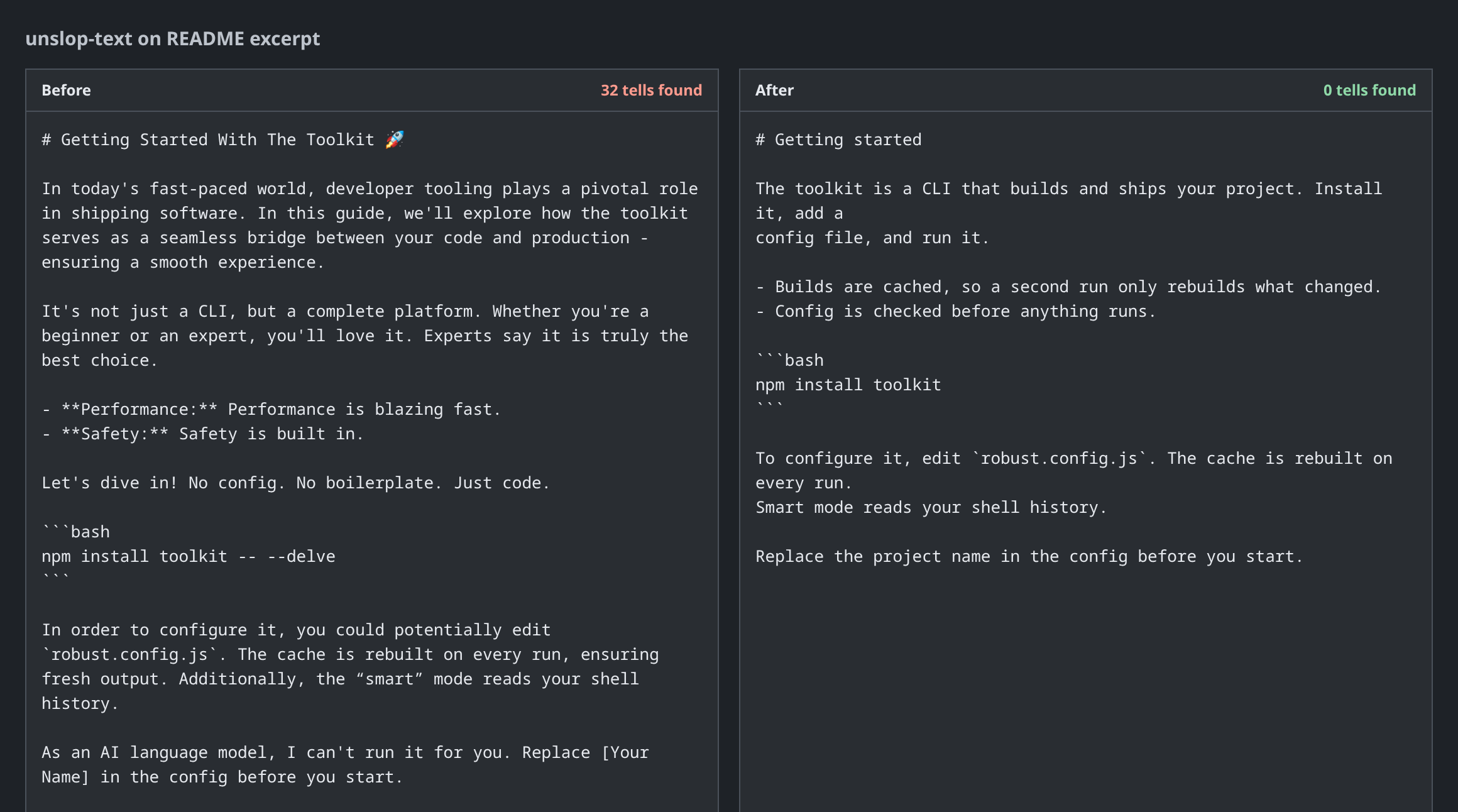
The rewrite keeps every fact: the CLI, the config file, the cache. It drops the claims nothing backed up, like “blazing fast”. If you want that claim back, the skill’s answer is a number.
TypeScript
unslop-typescript found 24 tells in one short file. The getUser function alone has two anys, two non-null assertions, a catch that only rethrows, a debug console.log and a JSDoc comment that says “Gets the user.”
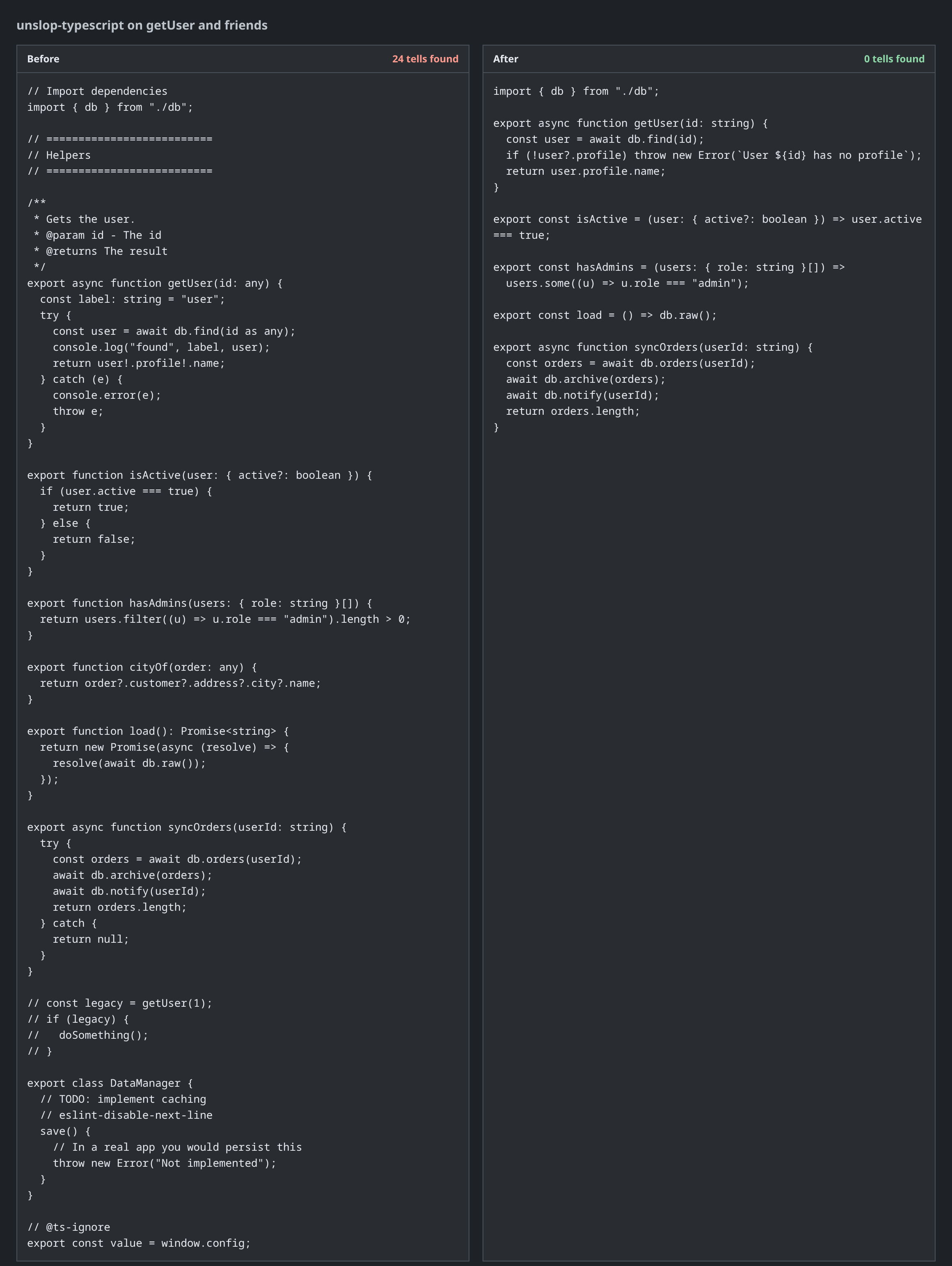
Two things in the after are worth being honest about. The failure now says what went wrong instead of throwing a bare undefined error. And I deleted cityOf and the DataManager stub outright, because nothing used them. A real run would list those as proposals for you to approve.
React
unslop-react found 13 tells in one component: a prop copied into state, an effect that only sets state, three booleans doing the job of one status value, and a component defined inside another component, which remounts on every render.
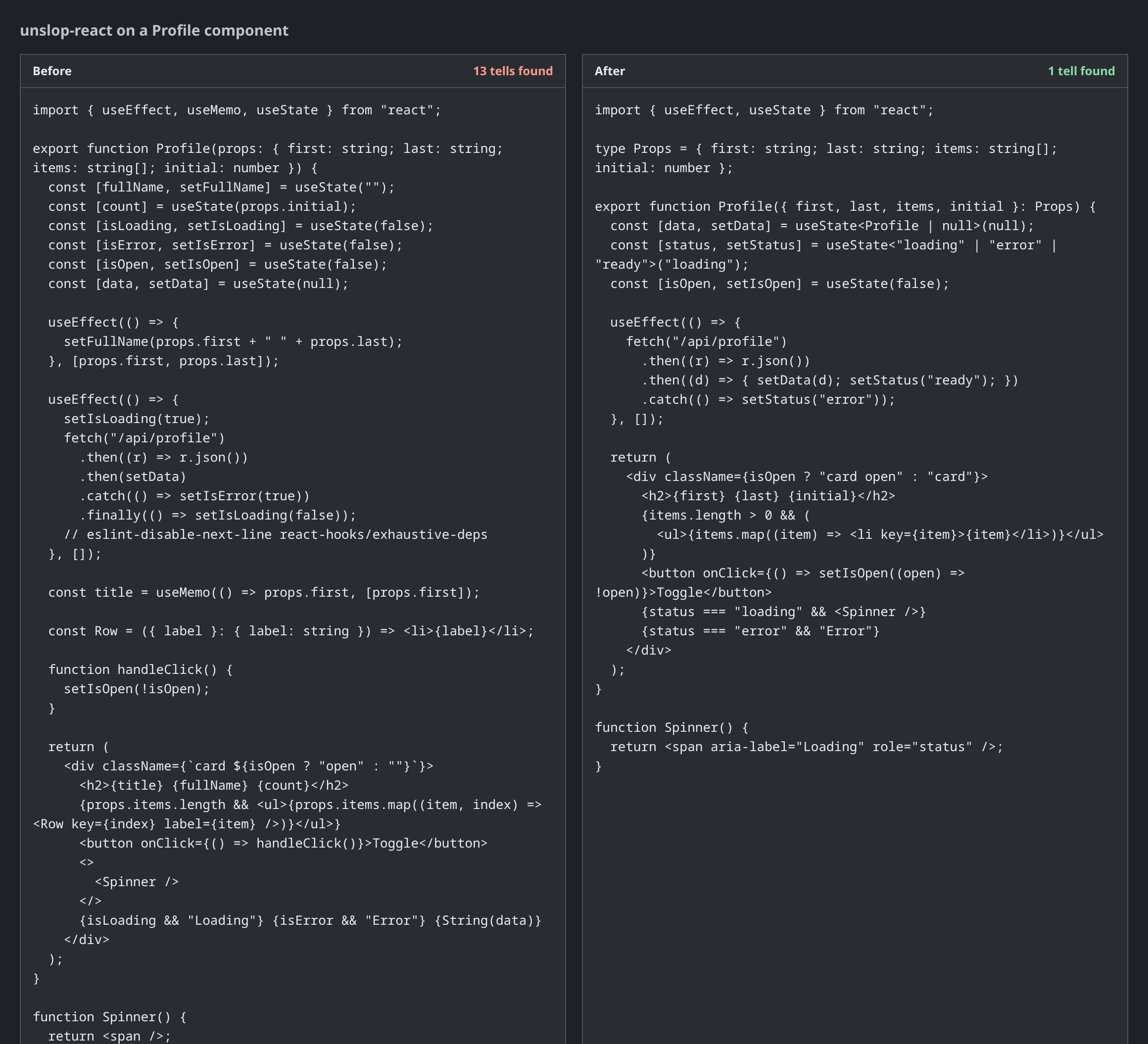
One tell is still there: fetch inside useEffect. I kept it on purpose. The skill’s advice is a data library, but adding a dependency to a small example is a call for the owner to make, so it stays a recorded keep.
C#
unslop-csharp found 24 tells in a class named UserManager: .Result on an async call, async void, a new HttpClient per call, throw e; that resets the stack trace, an empty catch, and a service locator.
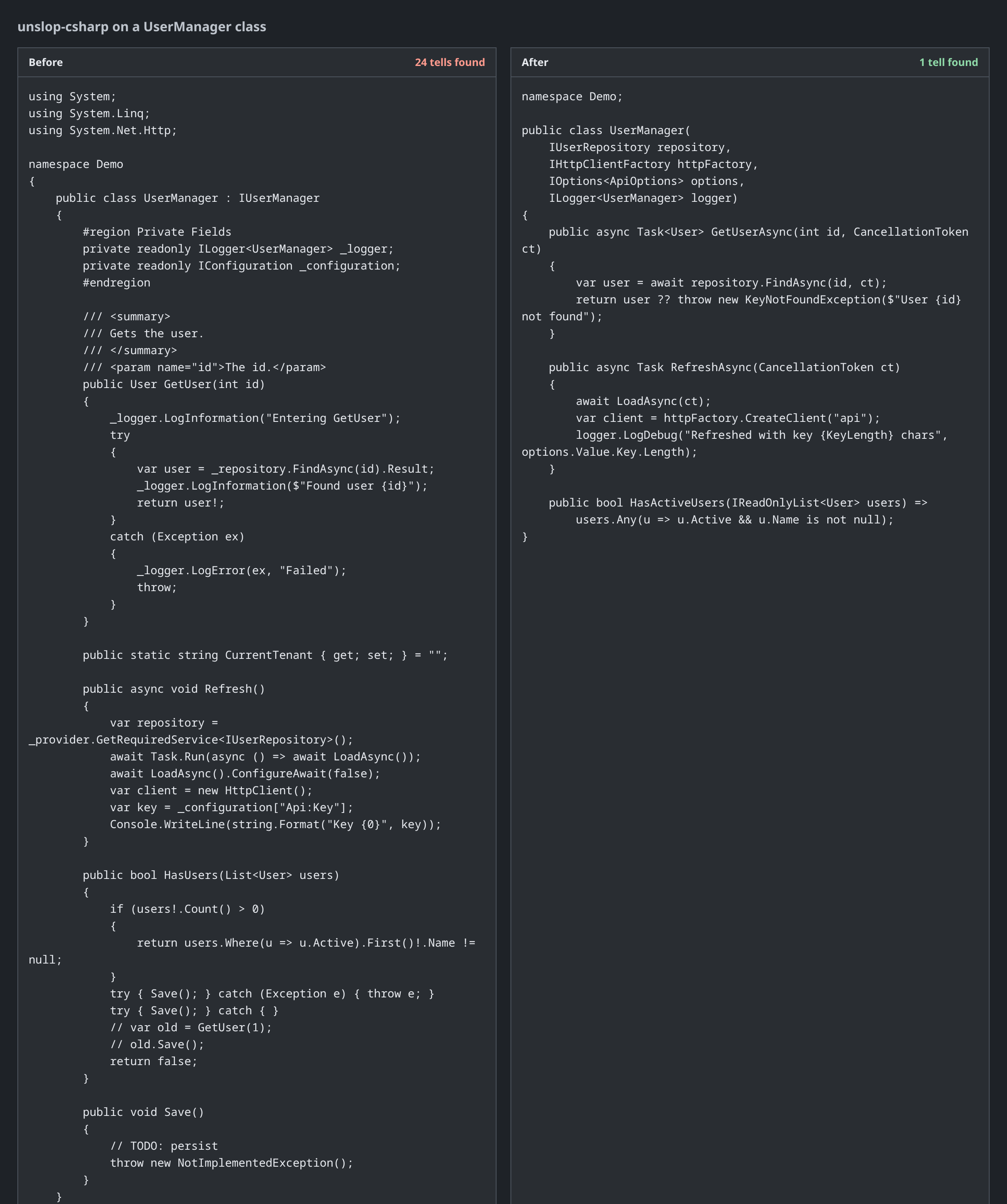
The scanner still flags the name UserManager. That is the “junk-drawer class” tell, and fixing it means splitting the class by what it does, which depends on code I don’t have in this example.
Tests
unslop-tests found 14 tells. This is the skill I trust the most, because a bad test is worse than no test. It makes you think the code is covered.
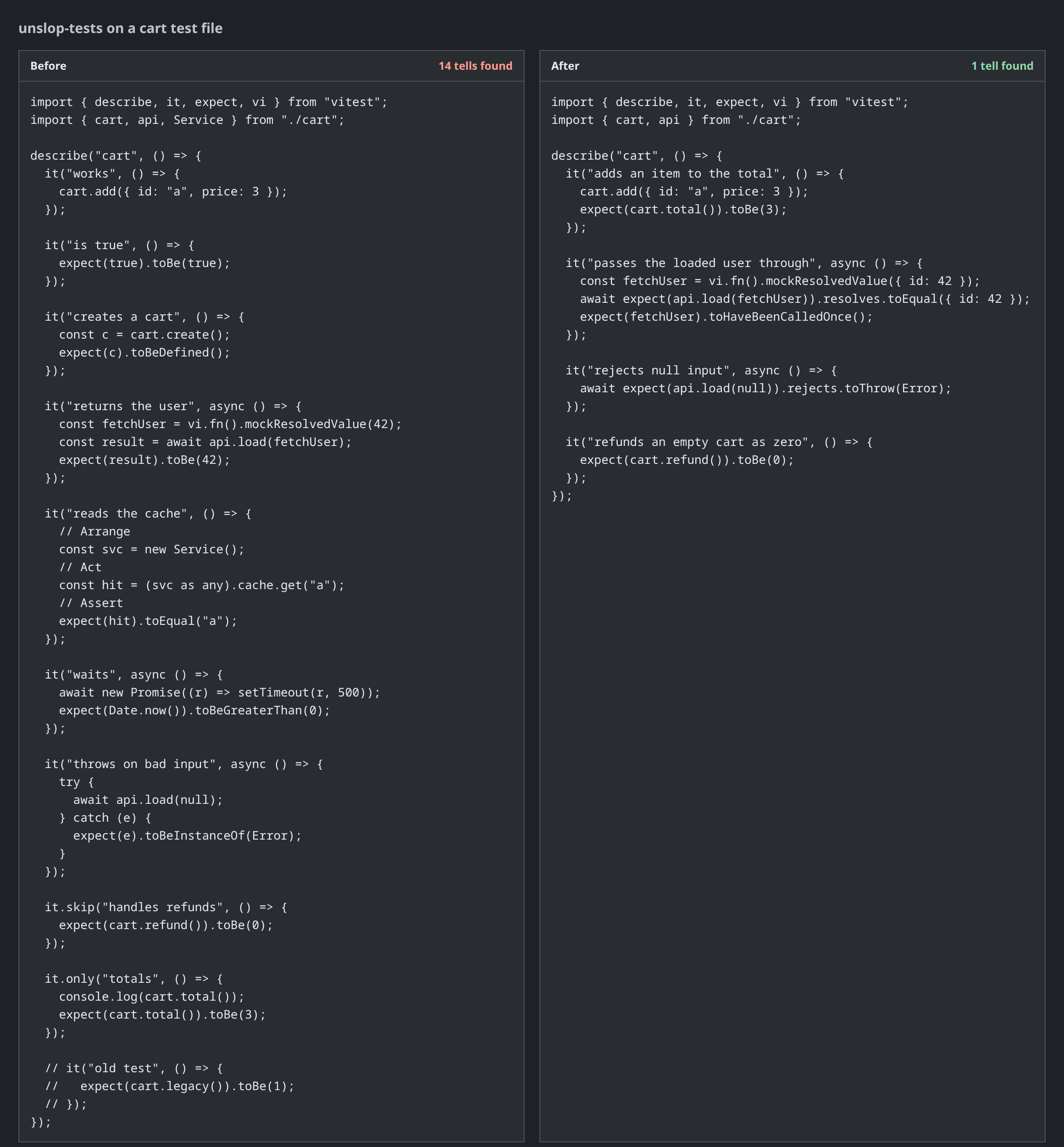
In the before file, it("works") has no assertion, expect(true).toBe(true) can’t fail, a 500 ms sleep checks that time exists, a try/catch passes when nothing throws, and an it.only silently turns off every other test. The remaining hit in the after is a mock whose return value I also assert on, which I’d normally tighten further.
UI
I built both screenshots below for the same fictional product, a static hosting service called Shiplane, so the comparison is fair. The first is the template an agent hands you when you ask for a landing page.

Every tell on that page is a default. The gradient text and the glowing blobs, the grid texture, the “New: AI-powered” badge, the “Trusted by 10K+” line with no source, and three glass cards with emoji icons and “Lightning Fast”, “Secure by Default”, “Seamless Integration”. The headline could describe any product. unslop-ui flagged 46 tells in the code for a page like this.
The second is what you get when you remove the tells and write down what the product does.
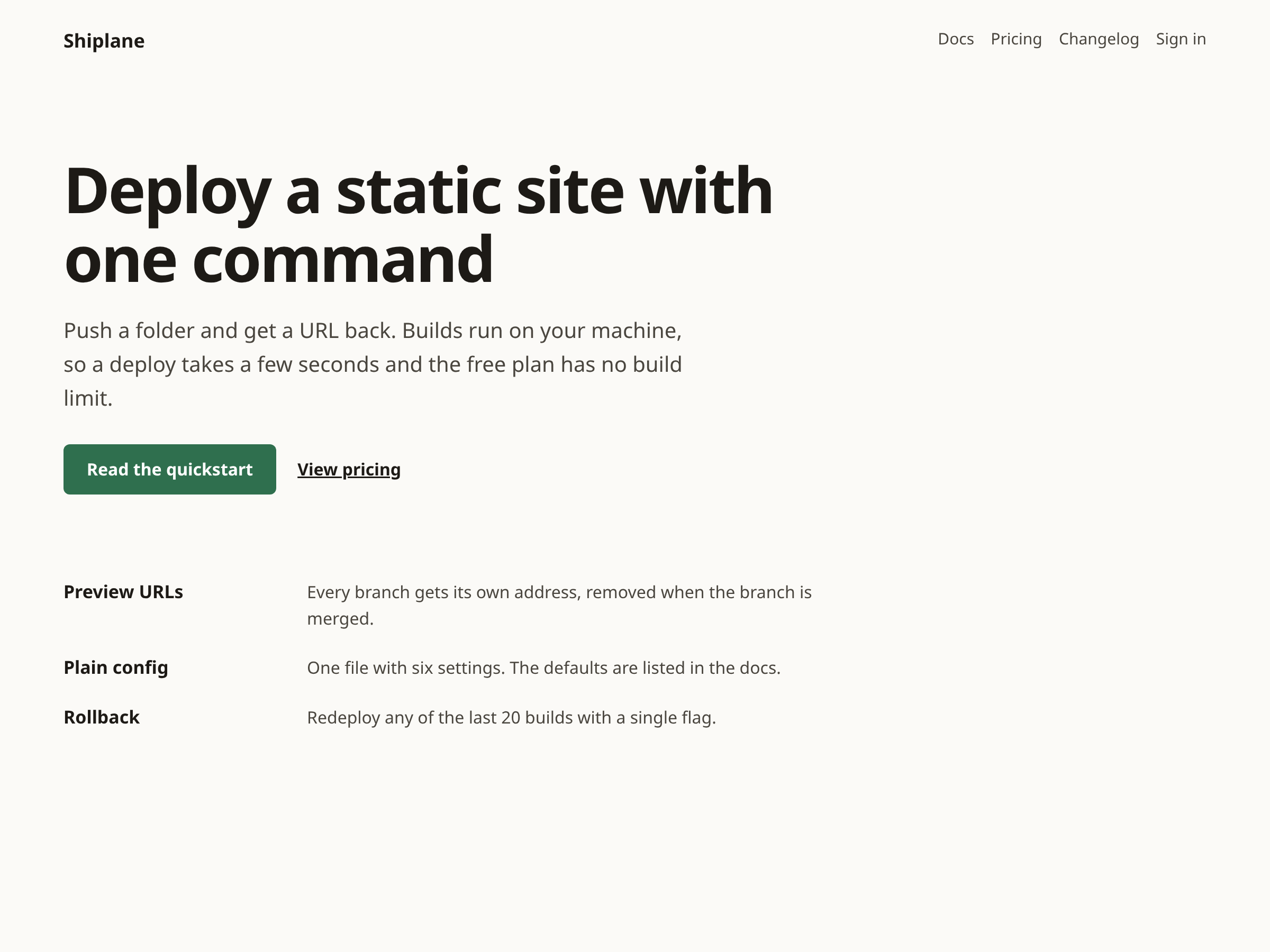
The headline now says what the product does. There is one accent color, one button, and the features are a plain list because they are a list. The skill does not delete numbers that are true. “Trusted by 10K+” is flagged because it has no source, so it asks where the number comes from.
Here is the code behind the tell count, from the skill’s fixture page:
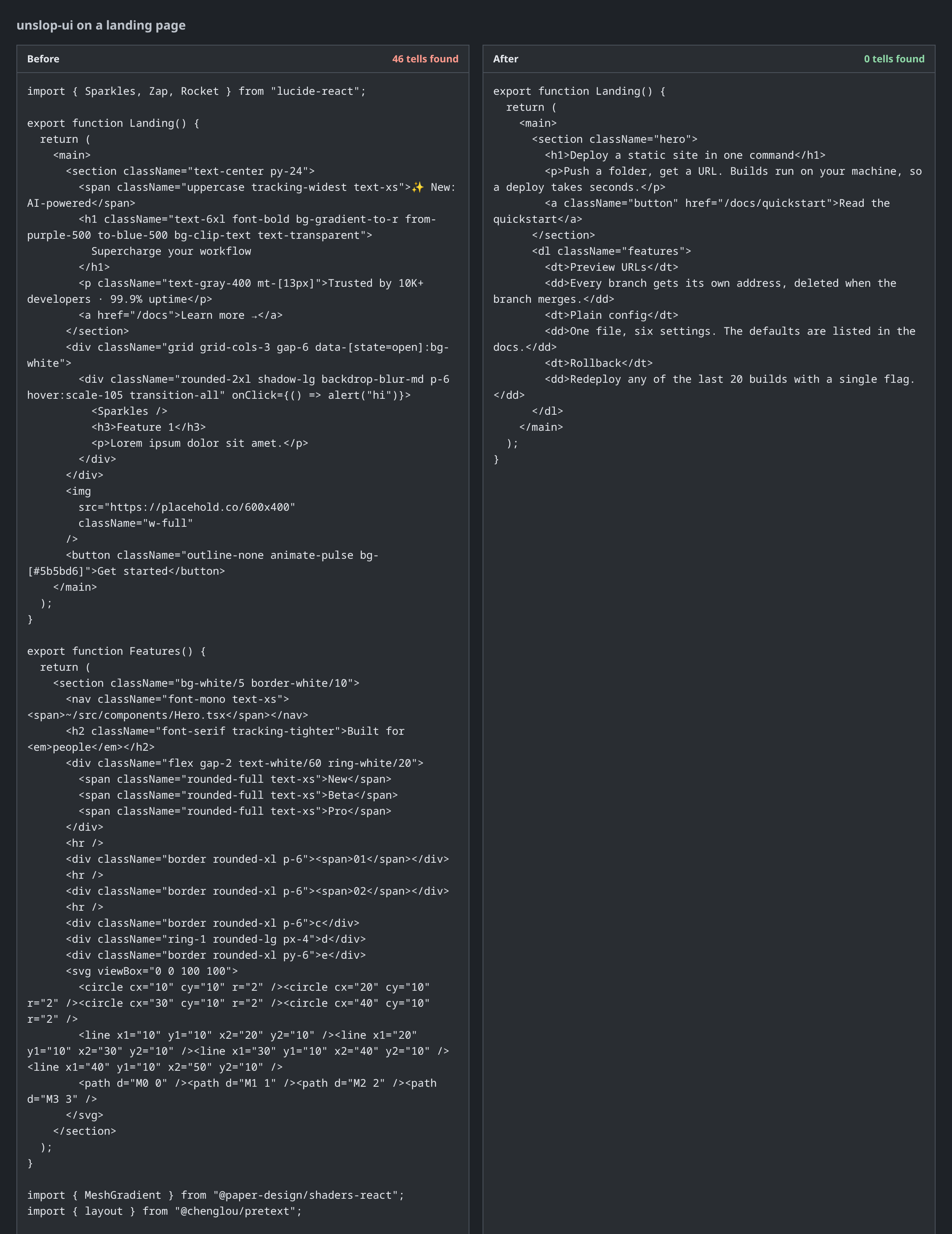
Both screenshots are mockups I made, not captures of a real site, and the page and its copy are invented. Removing the tells is the easy half. The hard half is having something specific to say, and no skill can supply that for you.
Git
unslop-git has a linter for commit messages and a command that rewords history. A typical agent commit:
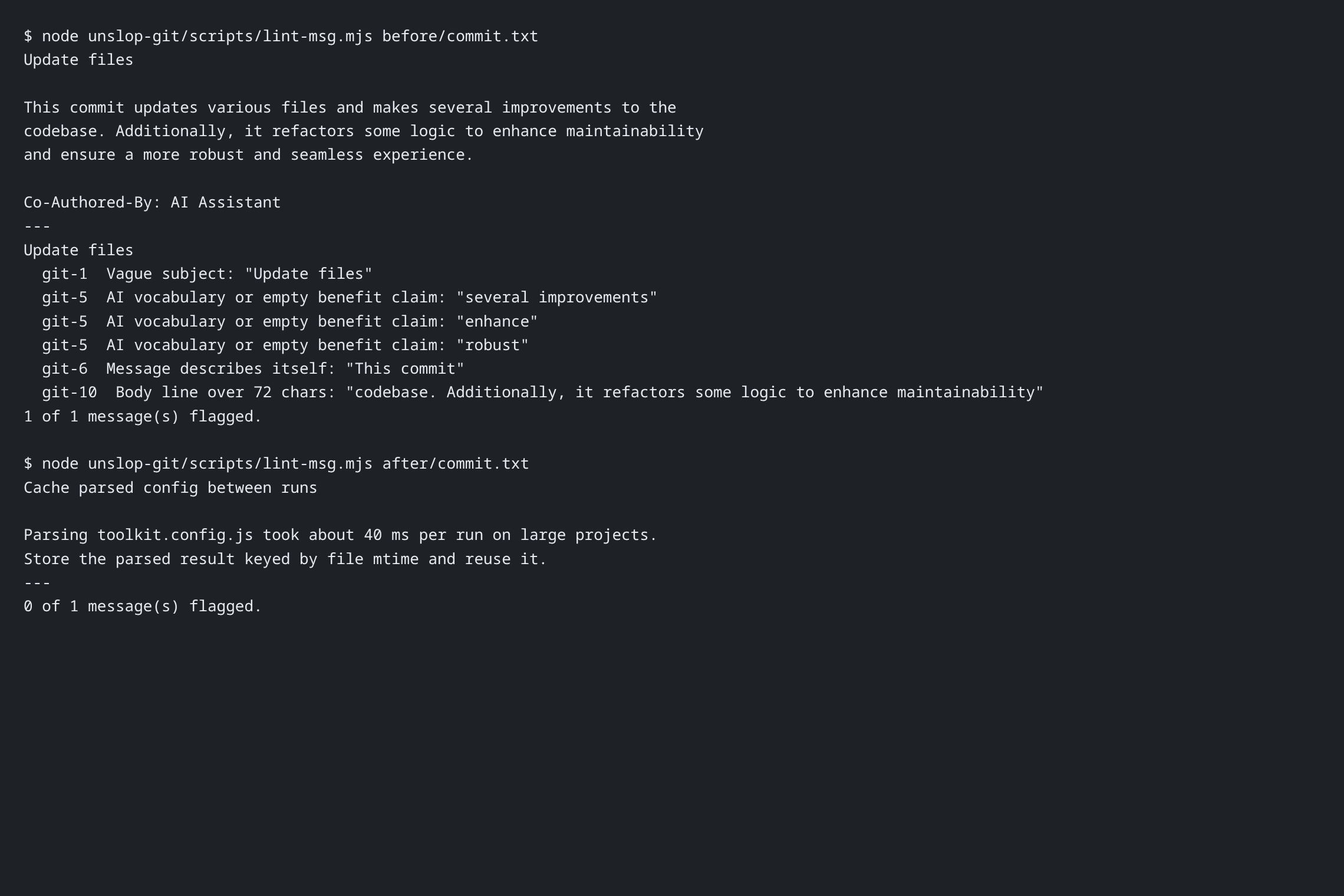
“Update files” says nothing. “Describes itself” (“This commit…”) is a tell, and so is the invented co-author trailer. The fix is a subject that states the change and a body that gives the reason.
Diff
unslop-diff is the one I use most. After an agent finishes, I run it on the uncommitted work. It checks only the lines that changed, so the old slop already in a file stays out of the pull request.
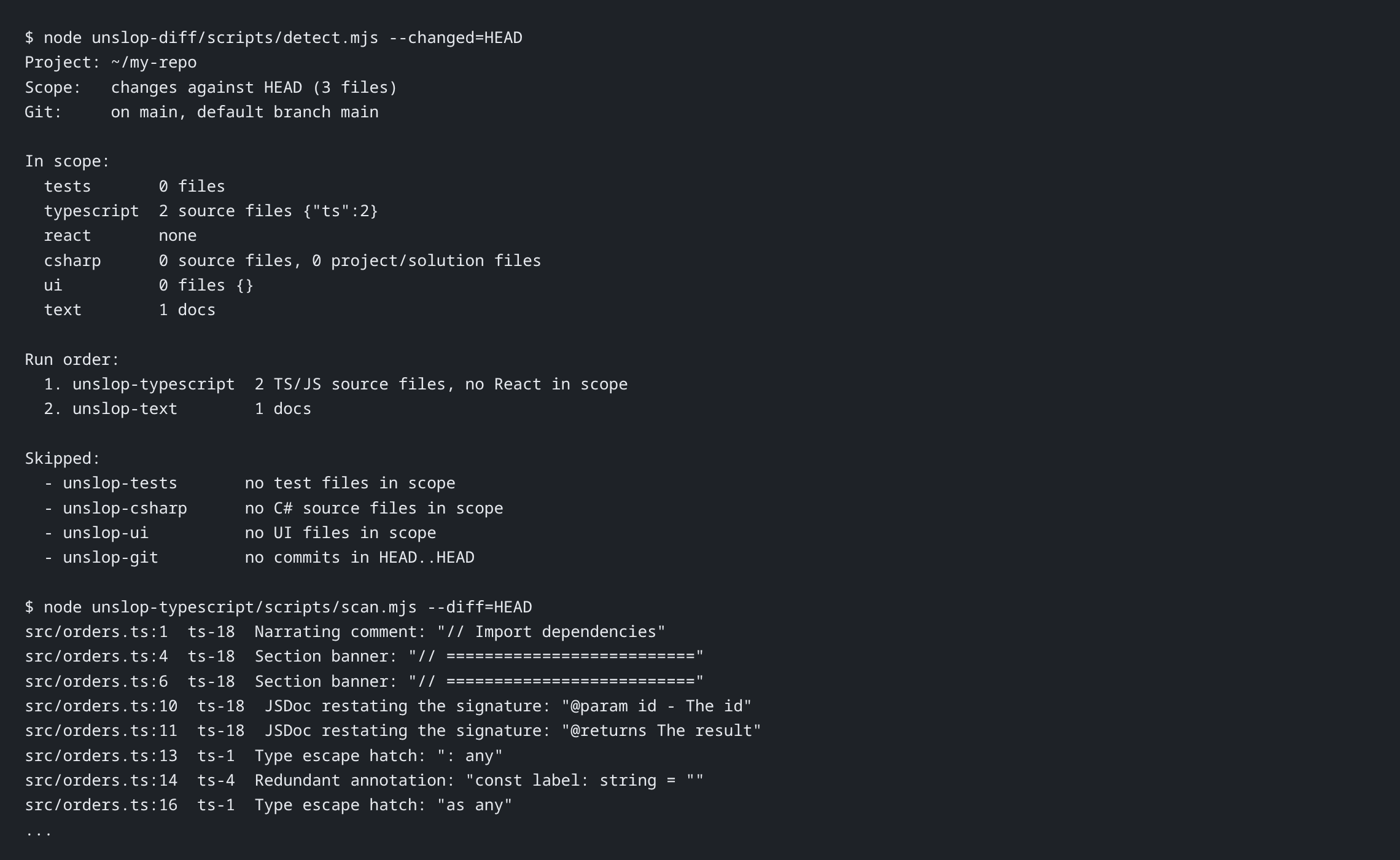
In this demo I committed a clean repo, then added one sloppy file and edited one clean one. It planned the TypeScript and text skills and skipped the others with a reason. The skipped list matters: it shows the skill decided something and wasn’t just running everything.
All
unslop-all is for a one-time cleanup of a whole repo. It surveys the project first, then asks what to cover, what to leave alone, and whether changes should land on a review branch with one commit per pass. It runs git last, so the commit messages can describe the other passes.
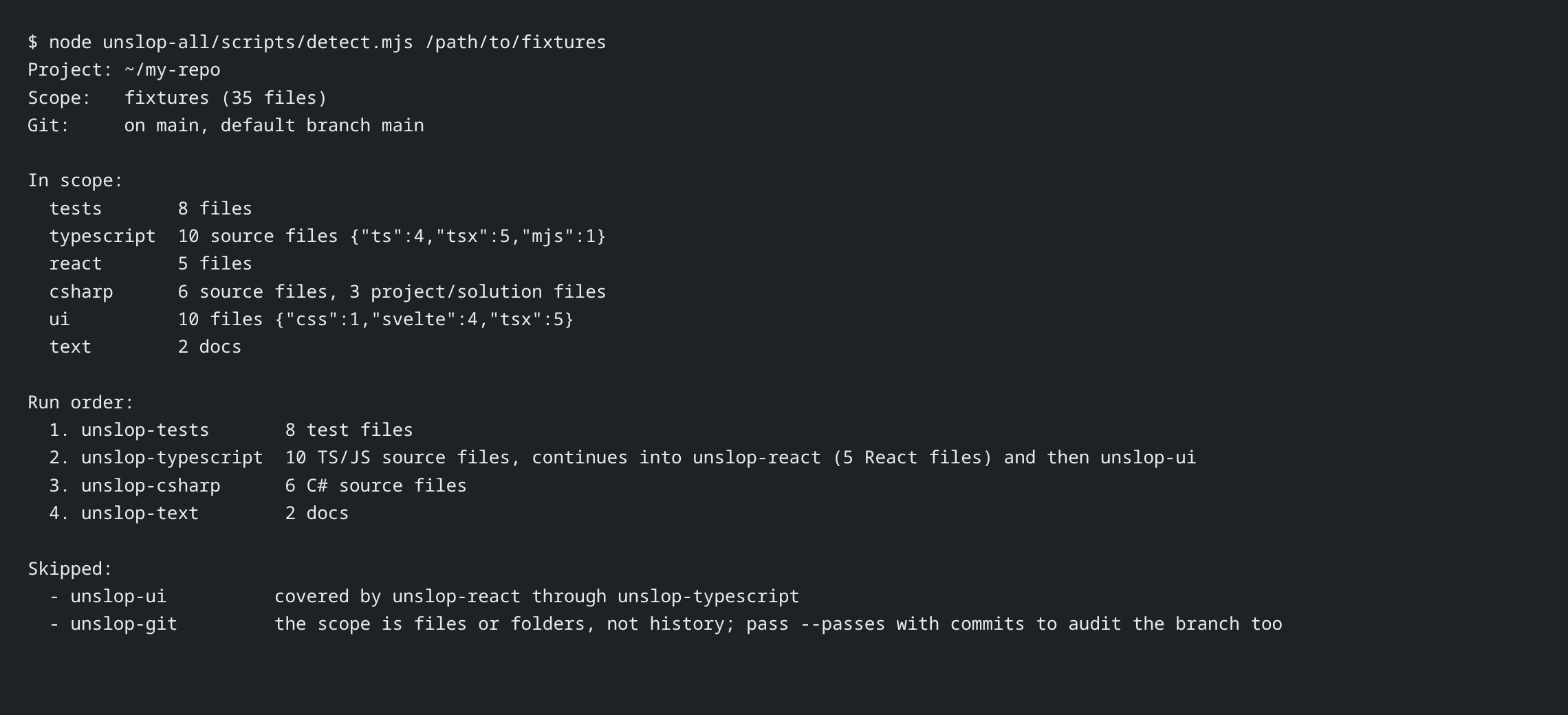
It reads your AGENTS.md or CLAUDE.md too, so folders marked read-only stay untouched.
What it can’t do
Scanner hits are candidates. The skills are written to judge each one, because some are legitimate: an any at a system boundary, or “robust” in a statistics post. They keep those and say why.
They also can’t give you taste. The UI skill removes the template look, but it can’t design your page. Treat it like a strict editor: it finds the lazy parts, and you still have to write the real thing.
If you use agents for real work, try them. A good first test is unslop-diff on whatever your agent last wrote.
npx skills add bberka/unslop-skills